
Norton LifeLock Scams
There's a dark irony in Norton LifeLock impersonation: scammers borrow the name of an identity-protection company to commit identity theft. Norton also carries decades of pre-installed familiarity. Almost everyone has had it on some computer, so almost nobody can immediately rule out a subscription quietly renewing somewhere.
Have a suspicious message from Norton LifeLock?
Check it with Scamwise — free, takes 30 seconds.
Loading the checker…
How Norton LifeLock is being impersonated
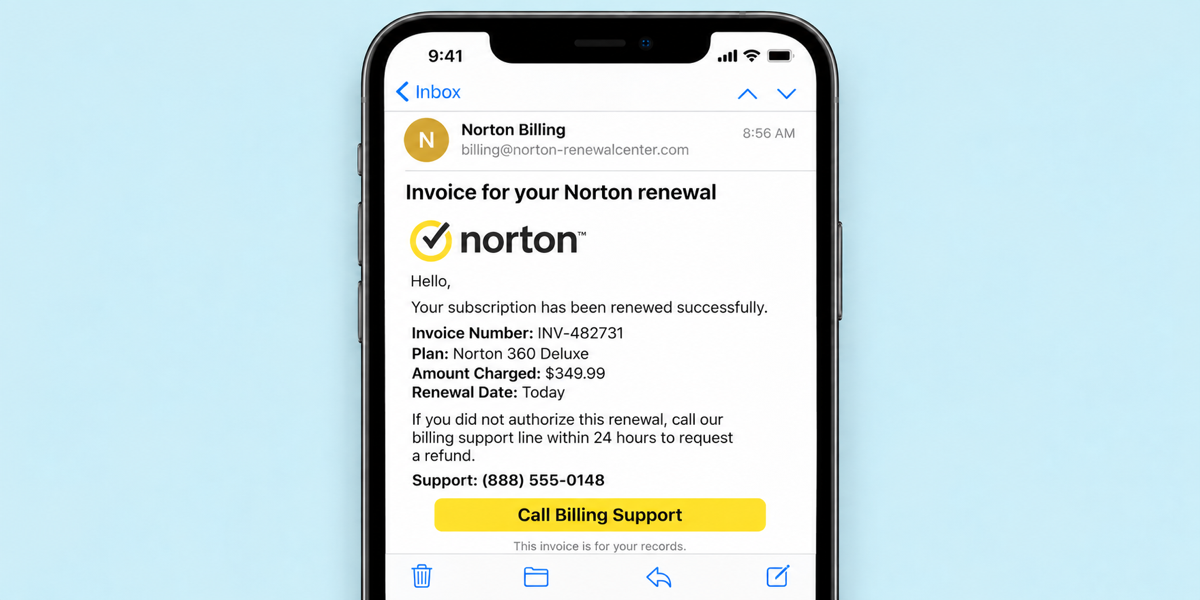
Popular impersonation lures to pay attention to:
The renewal invoice
An official-looking receipt says your Norton or LifeLock subscription auto-renewed for $349.99 or $499.99, with an invoice number and a support line to call "within 24 hours" for a refund. Almost no one who receives it has actually been charged. The invoice exists to make you pick up the phone.
The refund choreography
On the call, a fake agent requests remote access to "process the refund," stages a fake overpayment ("we accidentally refunded $35,000!"), and pressures the victim to return the difference via gift cards, wire, or crypto.
The protection-alert variant
Fake LifeLock "identity threat detected" pop-ups and emails that turn the product's own promise into the lure, a close cousin of scareware.
Second channel checks
Tips for verifying through official channels
- 1
Check your card or bank statement first.
A renewal that never hit your card never happened. No charge means a fake invoice; delete it.
- 2
Verify subscriptions by logging into norton.com or lifelock.com directly.
Typed into your browser. Your real subscription status and billing history live there.
- 3
Never call the number in the invoice, and never grant remote access.
No legitimate refund requires AnyDesk, TeamViewer, or Quick Assist. If someone is connected to your computer right now, disconnect from the internet and call your bank from the number on your card.